
Turn Facebook Posts into WordPress Portfolio Entries
Import posts tagged with a specific hashtag, generate titles and descriptions using AI, add images to the WordPress Media Library, and publish content after approval.
Problems
What’s not working today.
Great Projects Stay on Facebook
You publish excellent case studies on Facebook, but your website portfolio remains empty.
Manual Copying Takes Time
Every post requires copying content, downloading images, and editing everything manually.
Your Portfolio Becomes Outdated
Without automation, website updates are often forgotten and projects never make it to your portfolio.
A Social Post Is Not a Case Study
A short Facebook post needs a better title, structured content, and a professional description before it belongs on your website.
Solution
Facebook → AI → WordPress, Fully Automated
- The plugin retrieves posts from a Facebook Page based on a selected hashtag
- OpenAI generates a title and HTML-formatted article content
- Images are imported into the WordPress Media Library, with the first image set as the featured image
- Remaining images are automatically added to a gallery
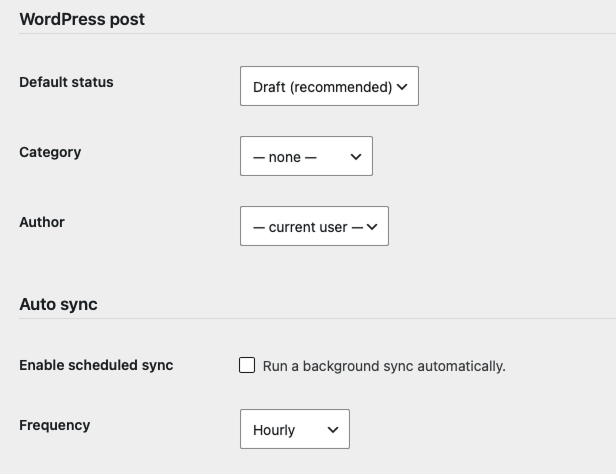
- By default, each entry is saved as a draft for review and approval before publication

Features
Everything you need.

Facebook Page Connection
Connect using a Facebook Page Access Token. One Facebook Page per installation.

Hashtag-Based Filtering
Use a configurable hashtag, such as #portfolio or #project, to select which posts are imported.

Editable AI Prompts
Full control over the style, tone, and structure of AI-generated content.

Image Import
All images are automatically imported into the WordPress Media Library.

Featured Image & Gallery
The first image is set as the featured image, while the remaining images are added to a gallery.

Draft-First Workflow
Posts are imported as drafts by default, giving you full control before publication.

Full Synchronization
Run synchronization manually with one click or automatically via WP-Cron.

Built-In Activity Log
Track all synchronization events with duplicate prevention based on Facebook post IDs.
Ready to get started?
Explore our plans and choose the one that fits your project.
How it works
Step by step.
Add a Hashtag
For example, #portfolio — you can change it at any time.
- Choose any hashtag to mark posts for import
- Change the hashtag directly from the WordPress dashboard
- Support for multiple hashtags can be added in future versions
The Plugin Finds Matching Posts
The plugin scans your Facebook Page through the Graph API.
- Automatically discovers new posts
- Prevents duplicates using Facebook post IDs
- Imports only posts containing the selected hashtag
AI Generates the Title and Description
OpenAI creates a complete case study based on the Facebook post and your custom prompt.
- Automatic generation of professional titles
- Expands short social posts into detailed case studies
- Fully editable prompts for complete control over writing style
Images Are Imported to the Media Library
The first image becomes the featured image, and the rest are added to a gallery.
- Automatic import of all attached images
- First image set as the featured image
- Remaining images create a WordPress gallery
Post Saved as a Draft
Review, edit, and publish the content — or enable full automation.
- Default status: Draft for safe content review
- Edit content before publishing
- Optional automatic publishing without manual approval

Admin panel
Everything Managed from the WordPress Dashboard
Configure connections, review posts available for import, monitor synchronization logs, and run manual imports — all from a single admin interface.
- Facebook Page ID and Access Token configuration
- OpenAI API Key and AI model selection
- Custom hashtag, category, and default post status settings
- Post list with "Import" and "Run Full Sync" action buttons
- Built-in synchronization log and import history
- Simple and intuitive setup with no coding required
Pricing
Choose the right plan
Solo
For freelancers and solo business owners.
- 1 Facebook Page
- 100 posts per month
- Default AI prompt
- Draft-first workflow
Business
For companies with an active Facebook presence.
- Up to 3 Facebook Pages
- 500 posts per month
- Editable AI prompts
- WP-Cron scheduling
- Email support
Agency
For agencies managing multiple client accounts.
- Unlimited Facebook Pages
- Unlimited posts
- White-label branding
- Priority support
- API access
All prices are net prices (excluding VAT). Monthly settlement.
FAQ
FAQs for FB Portfolio Sync
By default, no. Imported content is saved as drafts for review. Automatic publishing can be enabled in the plugin settings.
Yes. The hashtag can be updated at any time from the WordPress admin panel.
Yes. All images attached to the Facebook post are automatically imported into the WordPress Media Library.
Yes. The Business and Agency plans provide full control over AI prompts and content generation settings.
Not yet. The current version imports images only. Video support is planned for a future release.
Yes. Duplicate detection is based on Facebook post IDs, ensuring the same post is never imported twice.
Let Your Projects Publish Themselves to Your Website
Automate Your PortfolioInterested in This Plan?
Leave your name and email address, and we'll get back to you with more details.